4K Streaming Requirements for Internet Speed, Devices, and Subscription Tiers
Discover 4K streaming requirements for speed, devices, and plans. Get exact numbers for Netflix, Disney+, and more to stream in ultra HD without buffering.
Anúncios
A shiny 4K television means nothing if the content arriving on screen tops out at 1080p. Meeting the full 4K streaming requirements involves matching your internet speed, device capabilities, and subscription tier to the content you want to watch.
Most households already have the internet speed but miss one of the other two pieces. A wrong HDMI cable, an older streaming stick, or a base-tier subscription quietly downgrades your picture without any warning on screen.
Anúncios
This guide covers every link in the chain from your router to your retinas, with exact numbers and checklists so you can confirm true 4K playback tonight instead of assuming it works.
Internet Speed Thresholds That Make or Break 4K Playback
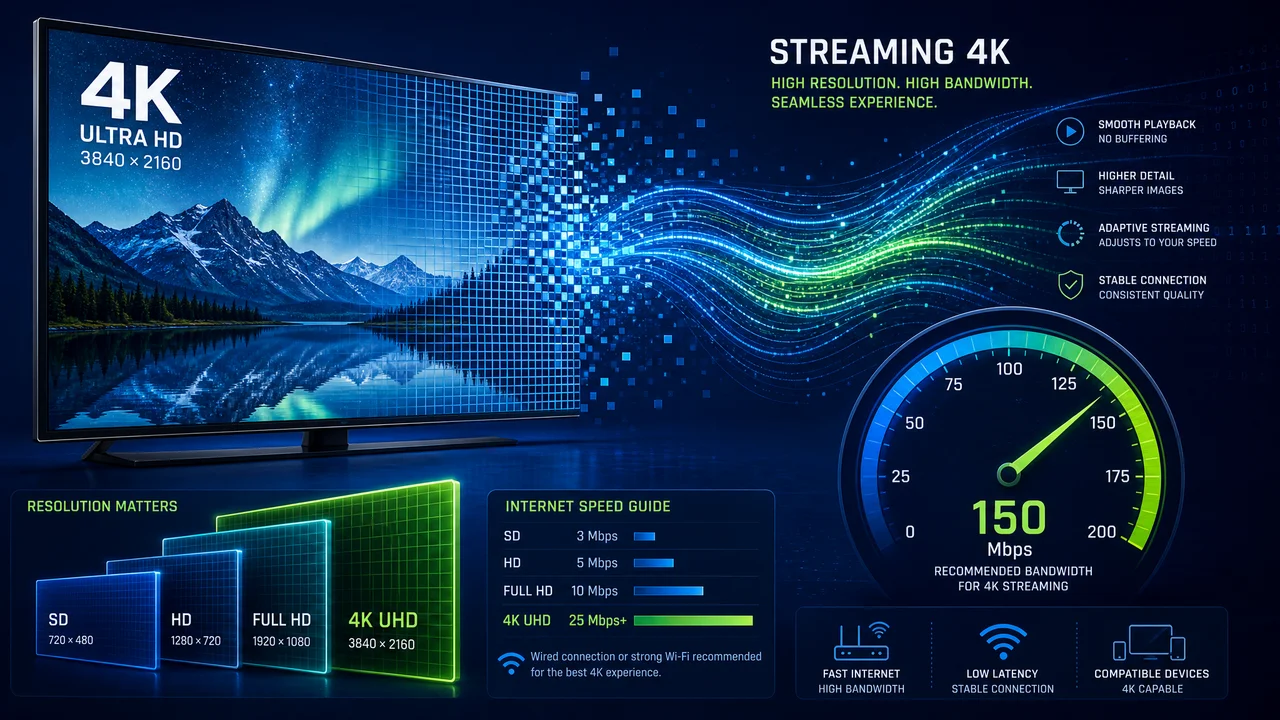
Netflix recommends 15 Mbps for 4K. That number represents the floor, not the target. Meeting 4K streaming requirements comfortably means budgeting 25 Mbps per simultaneous 4K stream to absorb network fluctuations.
Anúncios
A household running two 4K streams while a teenager video-calls on a laptop needs 70 Mbps minimum. Run a speed test at speedtest.net during peak evening hours, not mid-afternoon, to get an honest baseline.
Wired Ethernet Versus Wi-Fi Performance Gaps
Wi-Fi introduces packet loss and latency that speed tests do not always capture. A 200 Mbps connection over Wi-Fi might deliver only 80 Mbps to a TV three rooms from the router, dropping below 4K streaming requirements during congestion.
Plugging an Ethernet cable into your streaming device or smart TV guarantees stable throughput. A 15-foot Cat6 cable costs under $8 and eliminates the single most common cause of 4K buffering in home setups.
If running cable is impossible, place a Wi-Fi 6 mesh node within 15 feet of your TV. Mesh systems like Eero or Google Nest Wifi maintain speeds across rooms better than a single router broadcasting from a closet.
Data Consumption at 4K and Monthly Cap Awareness
One hour of 4K streaming on Netflix uses approximately 7 GB of data. Watching two hours per night burns through 420 GB per month on a single TV, which exceeds the 1 TB data caps many ISPs enforce.
Check your ISP account page for data usage and cap details. Comcast charges $10 per 50 GB overage block. AT&T Fiber has no cap. Knowing your limit prevents a surprise bill that erases any subscription savings.
Lowering non-essential streams to 1080p saves 4 GB per hour. Reserve 4K for movies and visually rich content on your primary TV, and let phones and tablets default to HD automatically through app settings.
| Streaming Service | Minimum Speed for 4K | Data Per Hour (4K) | Required Plan Tier | Takeaway |
|---|---|---|---|---|
| Netflix | 15 Mbps | ~7 GB | Premium ($22.99/mo) | 4K locked behind highest tier; no workaround |
| Disney+ | 25 Mbps | ~7.7 GB | All paid plans | 4K included on every tier, even ad-supported |
| Amazon Prime Video | 15 Mbps | ~6.8 GB | Prime membership | 4K included with Prime; no extra charge needed |
| Apple TV+ | 25 Mbps | ~6 GB | Standard ($9.99/mo) | All content streams at 4K Dolby Vision by default |
| Max | 25 Mbps | ~7 GB | Ultimate ($20.99/mo) | 4K reserved for top tier only; cheaper plans cap at 1080p |
Device and Cable Specifications That Unlock True 4K Output
Your internet speed can hit 500 Mbps and your subscription can be Premium, but a device bottleneck quietly drops your picture to 1080p without any notification. 4K streaming requirements demand attention at every link in the hardware chain.
HDMI cables, streaming sticks, and TV panels each have their own 4K prerequisites. Missing any one of them caps your resolution silently, and most platforms do not display a warning when this happens.
HDMI Cable Versions and HDCP Handshake Issues
HDMI 2.0 supports 4K at 60 frames per second. Older HDMI 1.4 cables cap at 4K/30fps, causing visible judder during fast motion scenes. Check the cable label or packaging for version numbers before assuming compatibility.
HDCP 2.2 is the copy protection standard required for 4K content. If your TV, HDMI cable, or AV receiver lacks HDCP 2.2 support, the stream downgrades to 1080p automatically. This is the most common invisible blocker of 4K streaming requirements.
- Replace any HDMI cable older than 2016. Pre-2016 cables likely lack HDMI 2.0 and HDCP 2.2 support. A certified Ultra High Speed HDMI cable costs $10 and removes the most common hardware bottleneck instantly.
- Check your AV receiver's HDMI passthrough version. Receivers bought before 2017 may strip 4K HDR signals. Connect your streaming device directly to the TV and use ARC/eARC for audio return to bypass the receiver entirely.
- Verify your streaming device supports the specific HDR format. Roku Express does not support Dolby Vision. Fire Stick 4K Max supports everything. Match your device to your TV's HDR capability list found in the display settings menu.
- Update your TV firmware before troubleshooting. Samsung, LG, and Sony push firmware updates that fix HDCP handshake bugs and add new HDR profiles. Check Settings, Support, Software Update on your TV model.
- Test with Netflix's 4K test pattern. Search "Test Patterns" in Netflix and play the 4K Dolby Vision clip. If the stream info overlay shows 2160p, your chain works end to end. If it reads 1080p, one link is failing.
Hardware verification takes ten minutes and prevents months of watching degraded video without knowing it. Run the Netflix test pattern once after every device or cable change.
Smart TV Built-In Apps Versus External Streaming Devices
Smart TV apps decode 4K natively without extra hardware. Samsung, LG, and Sony TVs from 2020 onward handle Netflix, Disney+, and Apple TV+ at full 4K Dolby Vision through their built-in processors.
Older smart TVs slow down over time as apps update beyond the hardware's capability. If your TV's Netflix app takes more than five seconds to load or stutters during playback, an external device like the Apple TV 4K or Fire Stick restores performance.
- Compare app versions between built-in and external devices. Some TV manufacturers delay app updates by months. If your TV's Disney+ app lacks a feature the phone app shows, an external device gets updates faster.
- Measure load times on your TV's built-in apps. Open Netflix, time it, then compare to an external stick. If the built-in app takes over seven seconds, the TV's processor is struggling and an upgrade pays for itself in daily time savings.
- Check if your TV supports HDMI eARC for Atmos passthrough. Connecting an external device requires eARC to send Dolby Atmos audio to a soundbar. Standard ARC compresses the signal to 5.1, losing the ceiling height channels Atmos provides.
- Disable the TV's internal apps if using an external device. Running both wastes memory and creates input-switching confusion. Set the TV to boot directly to the HDMI input where your streaming device lives.
- Factor in 4K streaming requirements when buying refurbished TVs. A 2018 model may have a 4K panel but lack Dolby Vision, HDCP 2.2 on all ports, or eARC. Verify specs on rtings.com before purchasing used hardware.
Built-in apps work well on TVs under three years old. Beyond that window, an external streaming device typically delivers faster performance and meets 4K streaming requirements more reliably while receiving updates sooner.
Subscription Tiers That Gate 4K Behind Premium Pricing
Meeting hardware and speed 4K streaming requirements means nothing if your subscription tier caps playback at 1080p. Netflix, Max, and Paramount+ all restrict 4K to their most expensive plans.
Disney+ bucks the trend by including 4K on every paid tier, even the ad-supported option at $9.99 per month. Apple TV+ does the same at $9.99 with Dolby Vision and Atmos on every title.
Price-Per-Pixel Math for Each Platform
Netflix charges $22.99 for Premium, which is $7.50 more than Standard. If you watch 30 hours per month, that premium costs 25 cents per hour of 4K. Decide if the resolution bump justifies a quarter per viewing hour.
Max's Ultimate tier at $20.99 adds 4K plus 100 offline downloads. The $16.99 tier caps at 1080p. If you use Max primarily on a phone, the $4 difference buys resolution your screen cannot physically display.
Amazon Prime Video includes 4K at no extra cost within the $14.99 Prime membership. Since Prime also covers shipping, music, and photo storage, the effective streaming cost approaches zero for existing members.
Future-Proofing Your Setup for 8K and Beyond
8K content barely exists in 2026, but buying HDMI 2.1 cables and a compatible device now prevents another upgrade cycle later. HDMI 2.1 supports 8K/60fps and 4K/120fps, both relevant for gaming and future streaming.
Apple TV 4K and the latest Chromecast both include HDMI 2.1 ports. Fire Stick 4K Max uses HDMI 2.1 as well. Roku's top models vary, so check the specific product page before assuming future compatibility.
Current 4K streaming requirements represent the baseline for the next five years. Investing $15 in proper cables and confirming device specs now avoids repeating this entire process when 8K streaming eventually arrives.
Confirming Your 4K Chain Works End to End
True 4K streaming depends on three links working together: internet speed above 25 Mbps per stream, a device and cable chain supporting HDCP 2.2 and your preferred HDR format, and a subscription tier that actually unlocks 4K content.
Run a speed test during peak hours, check your HDMI cables for version labels, and verify your subscription tier on each platform's account page. Those three checks take five minutes total and expose every weak link.
Start with Netflix's test pattern tonight. If it plays at 2160p, your 4K streaming requirements are fully met. If not, follow the chain backward from subscription to device to cable to router until you find the bottleneck.