Gaming Consoles as Streaming Devices: Complete Guide
Use your PS5, Xbox Series X, or Nintendo Switch as a streaming device. Compare app availability, quality, and features across gaming consoles.
Anúncios
If you already own a gaming console, you might not need a separate streaming device at all. Modern consoles run every major streaming app with quality that matches or exceeds dedicated streaming sticks and boxes.
Does the PS5 Work Well as a Streaming Device?
Anúncios
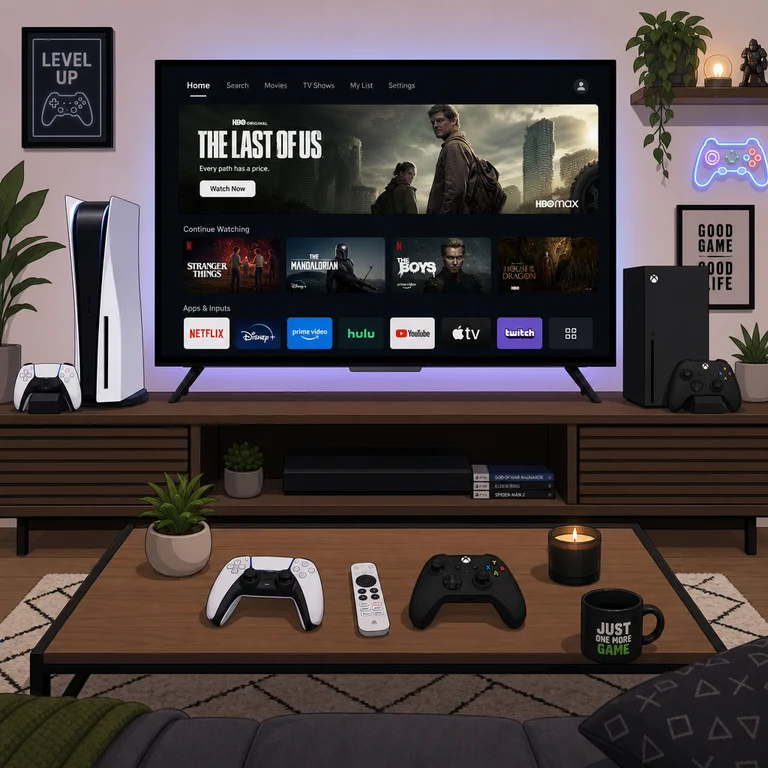
The PS5 supports Netflix, Disney+, Apple TV+, Prime Video, Hulu, Peacock, Paramount+, HBO Max, YouTube, Spotify, and dozens more streaming apps. The interface is snappy, app loading times are fast thanks to the SSD, and 4K HDR output looks stunning.
The DualSense controller works surprisingly well for streaming navigation with its touchpad acting as a cursor. Sony also added a dedicated Media Remote accessory with playback buttons that make the PS5 feel like a proper entertainment center rather than just a game machine.
Xbox Series X vs Series S for Streaming
Anúncios
Both Xbox consoles carry the same streaming app library with identical interface performance. The Series X outputs 4K Blu-ray and 4K streaming, while the Series S maxes out at 4K streaming without the disc drive for physical media.
The Xbox dashboard integrates streaming apps directly into the home screen, making them as accessible as games. Quick Resume even works with some streaming apps, letting you switch between a game and Netflix without reloading either application from scratch.
Can the Nintendo Switch Handle Streaming Apps?
The Nintendo Switch has a limited streaming app selection compared to PlayStation and Xbox. YouTube and Hulu are available, but Netflix, Disney+, and most other major services remain absent from the Nintendo eShop as of 2026.
The Switch OLED model looks gorgeous for handheld YouTube viewing, but the 1080p docked output and weaker hardware make it a poor substitute for dedicated streaming devices when connected to a TV. Keep the Switch for gaming and grab a $30 streaming stick instead.
Streaming App Availability Across Consoles
- Netflix — PS5 ✅ Xbox ✅ Switch ❌
- Disney+ — PS5 ✅ Xbox ✅ Switch ❌
- YouTube — PS5 ✅ Xbox ✅ Switch ✅
- Spotify — PS5 ✅ Xbox ✅ Switch ❌
- Apple TV+ — PS5 ✅ Xbox ✅ Switch ❌
- Prime Video — PS5 ✅ Xbox ✅ Switch ❌
- Hulu — PS5 ✅ Xbox ✅ Switch ✅
How Does Console Streaming Quality Compare to Dedicated Devices?
PS5 and Xbox Series X deliver 4K HDR streaming that matches Apple TV 4K and Roku Ultra in visual quality. The processing power of modern consoles means apps run smoothly with no stuttering, fast menu transitions, and reliable playback even on slower connections.
Dolby Atmos passthrough works on both PS5 and Xbox when connected to compatible audio equipment. Dolby Vision support is available on Xbox Series consoles for Netflix and Disney+ but remains absent on PS5 for most streaming apps.
Power Consumption: Console vs Streaming Stick
This is where consoles lose the comparison. A PS5 draws roughly 40-70 watts during streaming, while a Fire TV Stick uses 3-4 watts. Over a year of daily two-hour streaming sessions, the console costs approximately $15-25 more in electricity.
If energy cost matters to your household, using a dedicated streaming device for daily viewing and saving the console for gaming sessions makes financial sense. The convenience of one device does not fully offset the energy penalty over time.
Is a Console Media Remote Worth Buying?
Sony and Microsoft both sell dedicated media remotes for their consoles. These accessories add dedicated play, pause, fast forward, and volume buttons that make streaming navigation feel natural instead of clunky.
Third-party universal remotes from brands like PDP and 8BitDo cost less and work across both console and TV. If you regularly stream on your console, a media remote for $20-30 significantly improves the experience compared to fumbling with a game controller.
Can You Listen to Music While Gaming on Console?
Both PS5 and Xbox support background music through Spotify while playing games. This unique dual-use capability is something no dedicated streaming device offers. Adjust the music volume independently of game audio through the console audio mixer.
Apple Music is available on Xbox through the app, and PS5 users can access it via the built-in web browser workaround. Dedicated integration remains limited compared to Spotify, which has deep system-level hooks on both platforms.
Should You Buy a Console Just for Streaming?
No. A $30-50 streaming stick outperforms consoles in power efficiency, simplicity, and speed for pure streaming use. Buy a console for gaming and use its streaming capabilities as a bonus, not the primary justification for the purchase.
If you already own a console, skip the streaming stick purchase entirely. The console handles everything you need and reduces the number of devices cluttering your entertainment center. One HDMI input instead of two keeps your setup cleaner.
Future Console Streaming Features to Watch For
Cloud gaming integration is blurring the line between streaming devices and consoles further. Xbox Cloud Gaming and PlayStation Portal already let you stream games to other screens, and future updates may add features that benefit media streaming as well.
Both Sony and Microsoft are expanding their entertainment partnerships. Expect more streaming apps, better Dolby support, and deeper smart home integration as consoles evolve into true all-in-one entertainment hubs over the next hardware generation.